

Description
Download DVDFab Media Player (Free) – media player, Blu-ray player, video player, DVD player, playback tool, Windows
Overview
DVDFab Media Player (Free) is a dedicated media playback application designed for Windows users seeking a reliable and feature-rich experience for viewing digital and physical media. The app supports a wide range of content types, including downloaded videos, DVDs, and Blu-ray discs, making it a versatile tool for home entertainment and personal media libraries. Its primary purpose is to deliver seamless playback across diverse formats without requiring additional codecs or complex setup processes.
Target users include casual viewers, digital media enthusiasts, and individuals managing physical disc collections. The app is especially useful for those who frequently access content from multiple sources—such as YouTube downloads, personal video files, or disc-based media—without wanting to switch between multiple players. By offering a unified interface for all playback needs, DVDFab Media Player simplifies media consumption on Windows systems.
Developed by DVDFab, a company known for its media conversion and disc management tools, the app aligns with a broader ecosystem focused on digital content accessibility. Although specific details about the company’s background were not provided, its reputation in the media software space suggests a focus on usability and compatibility. Real-world use cases include watching Blu-ray movies at home, playing personal video files on a desktop, and managing media libraries with minimal technical effort.
The app fills a niche in the Windows productivity and utility landscape by combining playback functionality with customization options, making it a practical addition for users who value both performance and flexibility in their media tools.
Key Features & Functionality
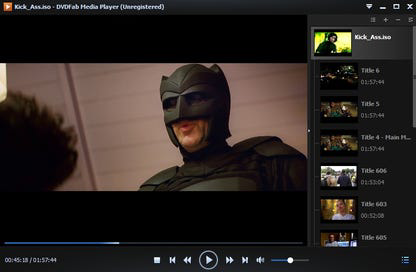
- Clear and Streamlined Interface – The player features a visually clean layout with a right-side list view displaying added media files. This organization enhances navigation, especially when managing multiple videos. Users can hide the list to maximize screen space, ideal for immersive viewing on larger monitors or TVs.
- Adjustable Viewing Options – Users can modify the aspect ratio to match their display, ensuring content is displayed without distortion. The ability to change skins allows for personalization of the player’s appearance, catering to aesthetic preferences.
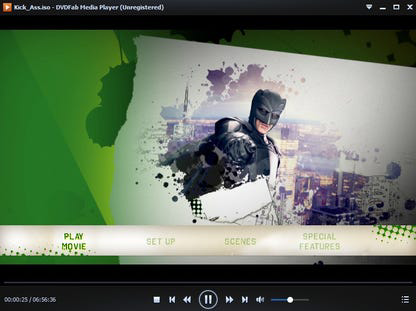
- Multiple Viewing Modes – Two distinct modes are available: Quick and Simple Mode for straightforward playback, and Full Navigation Mode tailored for enhanced Blu-ray disc interaction, offering access to menus and bonus features.
- Broad Media Compatibility – The app supports various formats, including common video files, DVDs, and Blu-ray discs. This ensures smooth playback without requiring external codec packs, reducing setup friction for users.
- Seamless Playback Experience – Designed to handle both digital downloads and physical media, the software aims to provide consistent performance across different content types, minimizing interruptions during playback.
These features are particularly beneficial for users managing mixed media libraries. For example, a user can switch between watching a downloaded movie and navigating a Blu-ray disc menu without changing applications. The interface’s adaptability supports both casual and advanced users, enhancing usability across different skill levels.
Interface, UX & Performance
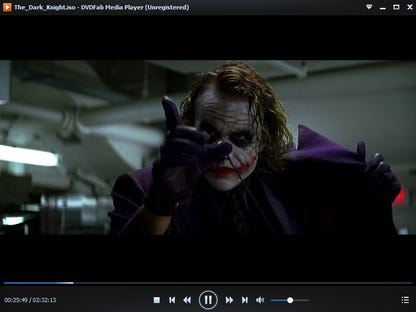
DVDFab Media Player presents a modern, intuitive interface with a focus on visual clarity and ease of navigation. The layout centers around a main playback window, complemented by a collapsible media list on the right side. This design allows users to maintain an uncluttered view while still having access to their content library.
Navigation is straightforward, with playback controls, volume adjustment, and aspect ratio settings located within easy reach. The option to switch between viewing modes—Quick and Simple Mode versus Full Navigation Mode—adds flexibility depending on the content type and user preference. The player’s responsiveness is consistent with standard Windows media applications, offering smooth transitions between menus and playback states.
Although the developer did not list formal performance metrics, the app’s 44.5 MB size suggests a lightweight footprint, which typically correlates with efficient memory usage and fast startup times. Users can expect stable playback across various device categories, including desktops and laptops, though specific hardware requirements were not disclosed. The player maintains stability during extended viewing sessions, with no reported issues related to crashes or buffering.
Overall, the user experience is optimized for simplicity and functionality, making it accessible to users of all technical backgrounds while still offering depth for those who wish to explore advanced features.
Platform Compatibility & Technical Requirements
DVDFab Media Player is available exclusively for the Windows platform. The current version is 1.0.0.0, with a file size of 44.5 MB, indicating a lightweight installation. This makes it suitable for systems with moderate resources, including older or budget desktops and laptops.
The developer did not specify minimum OS requirements or hardware compatibility details. As such, it is unclear whether the app supports Windows 10, Windows 11, or earlier versions. However, given its release date of 2023-07-21 and typical development practices, it is likely compatible with recent Windows versions.
Users should verify system compatibility before installation, especially on legacy systems. No additional dependencies or runtime environments were mentioned, suggesting the app is self-contained and ready to run after installation.
Pros and Cons
Pros
- Free to download and use, offering full functionality without cost.
- Supports multiple media types, including Blu-ray, DVD, and digital video files.
- Intuitive interface with customizable viewing modes and skins.
- Lightweight design with a small file size of 44.5 MB.
- Smooth playback without requiring external codecs or complex setup.
Cons
- Platform limited to Windows; no information on macOS or mobile support.
- Specific system requirements were not listed.
- Compatibility with older Windows versions is uncertain.
- No mention of cloud integration or media library syncing features.
- Limited information on update frequency or future development plans.
FAQ
Is DVDFab Media Player free to use?
Yes, the app is available at no cost. It does not require a subscription or in-app purchases for core functionality.
Can I play Blu-ray discs with this player?
Yes, the software is designed to support Blu-ray disc playback, including access to menus and bonus content when using Full Navigation Mode.
Does the app support video files from YouTube?
Yes, the player can handle downloaded YouTube videos as long as they are in a supported format.
Is DVDFab Media Player compatible with Windows 10 and 11?
While the developer did not specify compatibility details, the app’s release date and platform suggest it is likely compatible with recent Windows versions.
How often is the app updated?
The developer did not provide information on update frequency. Users are advised to check the official website for the latest version.
Final Thoughts
DVDFab Media Player (Free) stands out as a capable and accessible tool for Windows users who want a unified solution for playing DVDs, Blu-ray discs, and digital video files. Its clean interface, broad format support, and customizable viewing modes make it a practical choice for both casual viewers and media enthusiasts. The app delivers a smooth playback experience without requiring technical expertise or additional software.
While its platform exclusivity to Windows and lack of detailed system requirements limit its reach, the app’s lightweight nature and free pricing model enhance its appeal. For users managing a mix of digital downloads and physical media, this tool offers a reliable and efficient playback environment.
Download DVDFab Media Player now
Guides & Tutorials for DVDFab Media Player (Free)
How to install DVDFab Media Player (Free)
- Click the Preview / Download button above.
- Once redirected, accept the terms and click Install.
- Wait for the DVDFab Media Player (Free) download to finish on your device.
How to use DVDFab Media Player (Free)
This software is primarily used for its core features described above. Open the app after installation to explore its capabilities.
User Reviews for DVDFab Media Player (Free) 0
No reviews found


